SupportInventory Reports
Kit Inventory Report
Overview
The Kit Inventory Report provides real-time visibility into both Kit-to-Stock (pre-assembled) and Kit-to-Order (assembled on-demand) products. This tool helps you effectively manage inventory levels, monitor component availability, and plan for efficient order fulfillment.
Where to Find It
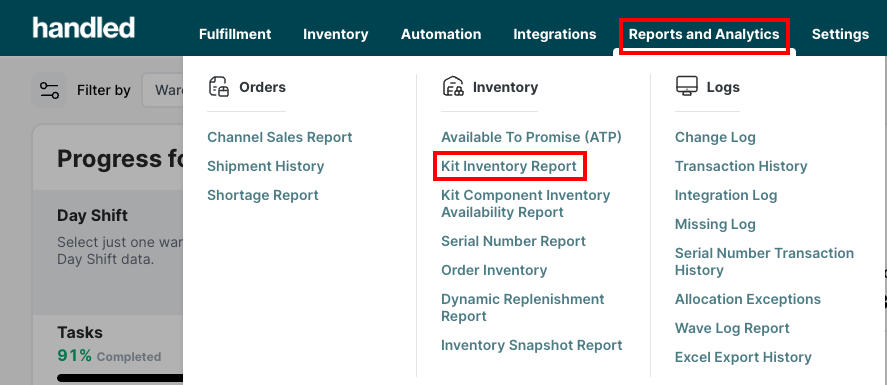
Navigate to Reports and Analytics > Kit Inventory Report in the Handled client portal.
What It's Used For
This report is essential for:
- Tracking current inventory levels of kits and their components.
- Understanding how many kits can be assembled based on component stock.
- Monitoring outstanding sales orders for kits.
- Streamlining production and fulfillment planning.
Whether you're pre-building kits for stock or assembling them just-in-time, this report helps optimize your inventory and avoid fulfillment delays.
How It Works
The Kit Inventory Report updates in real time and categorizes kits by their type (Kit-to-Stock or Kit-to-Order). For Kit-to-Order items, the system calculates assembly capacity based on current component availability. For Kit-to-Stock, it reflects finished inventory already on hand. It also accounts for pending orders, helping you identify shortages or assembly needs.
Key Field Definitions
| Field | Description |
|---|---|
| SKU | Unique identifier for each kit product. |
| Product Name | The name of the kit. |
| Product Barcode | Barcode assigned to the kit. |
| Kit Type | Specifies if the kit is Kit-to-Stock or Kit-to-Order. |
| Pack Type Name | Describes the packaging format used. |
| Warehouse | The warehouse where the kit is stored or assembled. |
| Product Group | Category or group the kit belongs to. |
| Product Type | Further classification (e.g., finished good, bundle). |
| Total Inventory Capacity | Maximum number of kits that can be fulfilled, based on component stock plus finished kits. |
| Net Kitting Capacity | Number of kits that can be built from currently available components (excluding stocked kits). |
| Pending Order Quantity | Number of kits required for non-shipped sales orders. |
| Current Inventory Quantity | Finished kits on hand (always zero for Kit-to-Order items). |
| Required Kitting Quantity | For Kit-to-Order: equals the pending order quantity. For Kit-to-Stock: equals pending order quantity minus stocked inventory. |