SupportInventory Reports
Inventory Snapshot Report
Overview
The Inventory Snapshot Report provides daily, time-stamped snapshots of your on-hand inventory across all warehouses. Each snapshot is taken at the same time every night and includes quantities, locations, packaging, and lot information. Unlike typical snapshot reports that reflect a single day, this report lets you define a date range—up to 30 days—to review inventory history over time.
This makes it an essential tool for financial reconciliation, audit preparedness, and operational accuracy.
Where to Find It
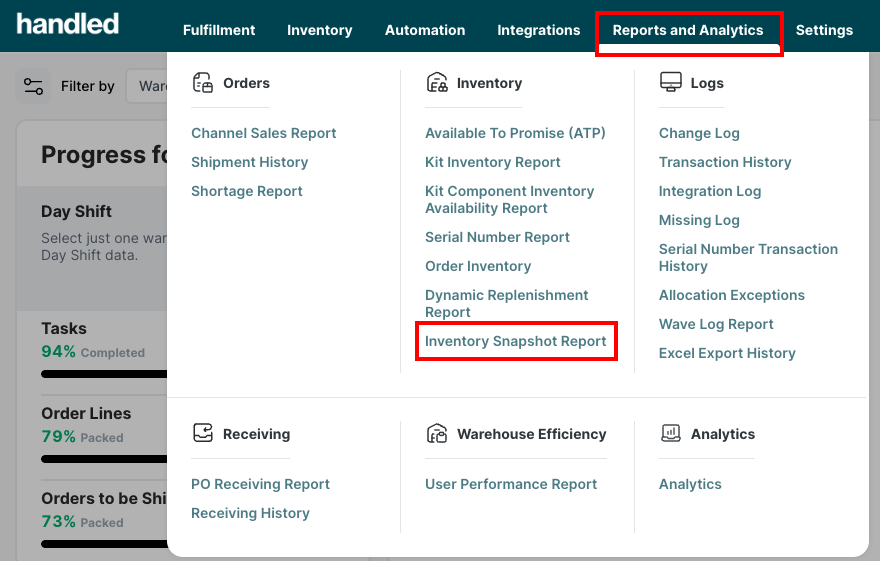
Navigate to Reports and Analytics > Inventory Snapshot Report in the Handled client portal.
What It's Used For
- Financial Reconciliation – Tie daily inventory records to billing cycles and end-of-month close.
- Historical Analysis – Review inventory changes over time for trend analysis and variance investigation.
- Audit & Compliance – Access validated, point-in-time records for each day—ideal for regulated industries.
- Space & Stock Planning – Monitor SKU-level trends to optimize replenishment and warehouse usage.
- Lot & Expiry Tracking – See historical views of expiring or perishable products.
How It Works
The system captures a snapshot each night of your inventory in every warehouse—SKU by SKU and bin by bin. You can select a custom date range (up to 30 days) to see daily inventory positions for each product over time.
Snapshots reflect inventory as it existed at the end of each day. All data is real-time as of the nightly cut-off and cannot be retroactively changed. Filters are restricted to 30-day spans. If a filter exceeds this range, the report will show a clear error message and automatically disable unsupported options.
The report is exportable to Excel or your BI tool for deeper analysis.
Key Field Definitions
| Field | Description |
|---|---|
| Warehouse | The specific warehouse where the product is stored. |
| Snapshot Date | The date when the inventory snapshot was captured. Filters are restricted to 30 days or fewer. |
| SKU | The stock-keeping unit identifier for the product. |
| Location | The location code within the warehouse where the product is stored. |
| UOM Qty | The quantity of the product in its base unit of measure (UOM). |
| Pack Qty | The quantity of the product based on its pack size. |
| UOM Pack Type | The type of packaging for the product in its base unit of measure. |
| Pack Type | The type of packaging used for the product (e.g., box, pallet, etc.). |
| Lot Batch Number | The lot or batch number associated with the product, if applicable. |
| Expiry Date | The expiration date of the product, if applicable. |
| Damage Reason | The reason for any damage noted for the product, if applicable. |
| Inventory Status | The current status of the inventory (e.g., available, damaged, on hold). |