SupportOrder Management
Common Shopify Connection Problems
If Handled lets you know that your Shopify store could not be connected, it is usually caused by one of two issues:
- The Shopify app was not installed correctly.
- The wrong Shopify credentials were sent to Handled.
Please follow the steps below to check your setup.
1. Confirm the App Is Installed
First, log in to your Shopify admin and confirm that the app was installed successfully.
Go to:
Settings → Apps
Confirm that the app appears in your list of installed apps.
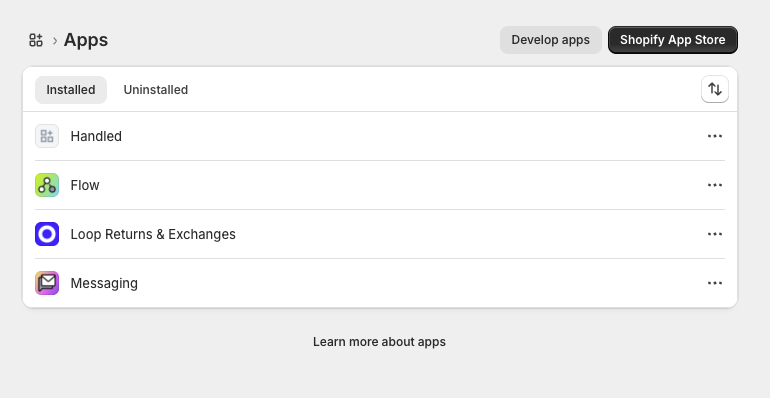
If the app does not appear in the installed apps list, it may not have been installed correctly. Please return to the Shopify connection instructions and complete the installation steps again.
2. Confirm You Sent the Correct API Credentials
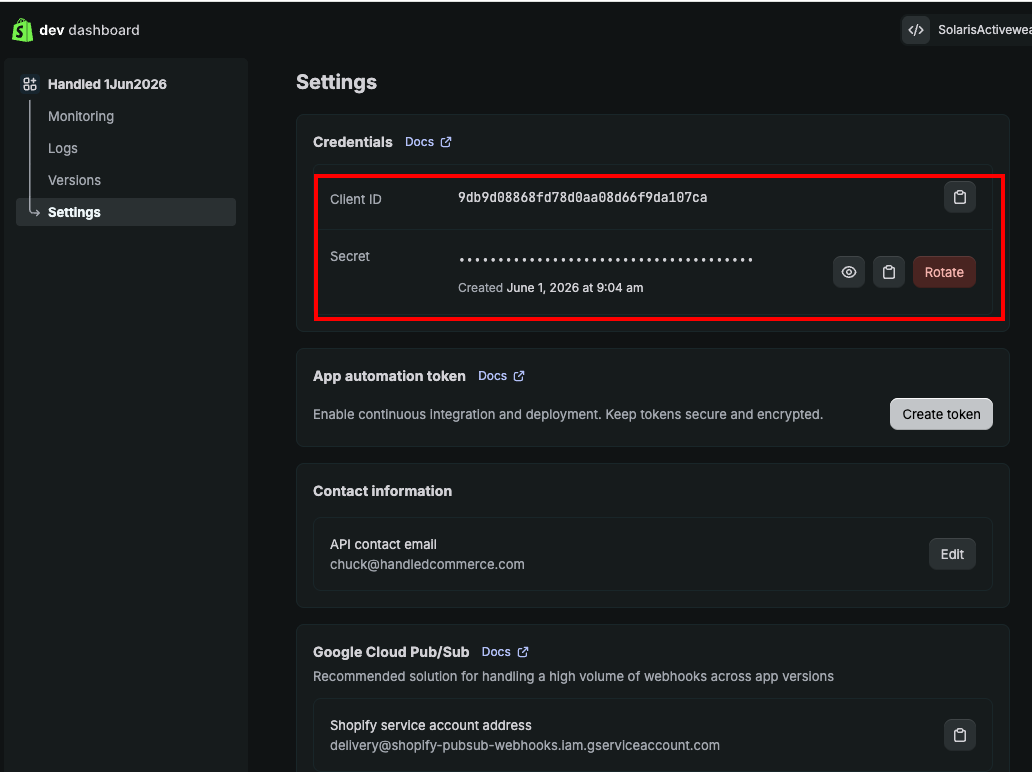
Shopify shows more than one set of credentials for apps, so it is important to send the credentials from the correct page.
Go to:
Settings → Apps → Develop apps → Build apps in Dev Dashboard → Settings → API Credentials
The page should look similar to the screenshot below.
3. Re-Send Your Shopify Credentials
After confirming that the app is installed, please copy the Client ID, Secret, and Shopify store name and email them to:
Once we receive the correct credentials, we can retry the Shopify connection.